
Recommendation Logics
Logic allows you to specify the desired behavior of the recommendation model.
While Recombee is generally a domain-independent recommendation engine and the default model is optimized to work well in most cases, we have used our experience in some frequent domains to setup some tuned models, and you can now easily pick the logic that is tailored for the particular case.
Setting Logic in the Admin UI
You can assign a particular logic to a Scenario in the Admin UI.
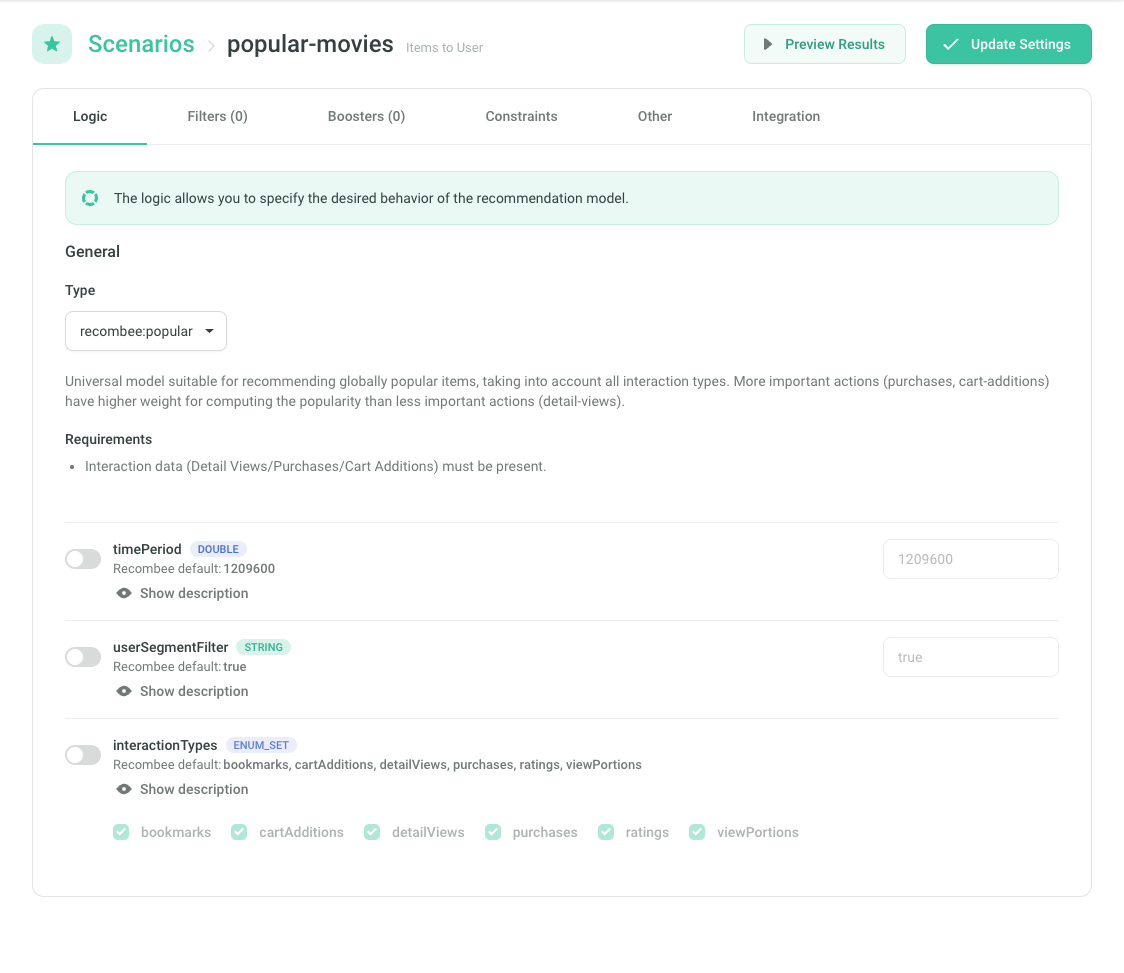
Alternatively you can use API parameters to set the logic.
List of Logics
Below is a list of logics available for most databases. Some databases tweaked by the Recombee support team may have custom logics not specified here.
See Integration Tips if you are not sure which logic should be used in your use case.
Universal Models
Universal Recombee models for the most common use-cases.
recombee:default
Default model ensemble aiming to work well in most common use cases. It is an ensemble of collaborative filtering and content-based recommendation, backed by popularity-based models when there's not enough data in the given context. The ensemble is being continuously optimized by AI so it automatically adapts to incoming data.
recombee:homepage
Universal model ensemble suitable for putting recommendations on the homepage / welcome-screen scenarios.
recombee:personal
Universal model ensemble suitable for user-based recommendations reflecting the personal tastes of the current user.
There must be interaction data for the user.
recombee:similar
Universal model ensemble suitable for either recommending items which are similar to the given item (in case of Items-to-Item recommendation), or recommending users who are similar to the given user (in case of Users-to-User recommendation).
recombee:popular
Universal model suitable for recommending globally popular items, taking into account all interaction types. More important actions (purchases, cart-additions) have higher weight for computing the popularity than less important actions (detail-views).
Interaction data (Detail Views/Purchases/Cart Additions) must be present.
Parameters
The time period in which the popularity is measured.
ReQL filter on top of user properties defining the segment of users among whom the popularity is calculated. For example, when user properties like profession and country are provided for some users, you may only ask for items popular among software developers in US and Canada: 'profession'=="software developer" and 'country' in {"US", "CA"}.
Interaction types to be taken into account when computing the popularity. By default, all the interactions are taken into account. But for example by providing only ["purchases"], you will retrieve items which are most frequently purchased, no matter how frequently are they (or the other items) viewed, bookmarked, etc.
recombee:popular-segments
Universal model ensemble suitable for recommending globally popular segments.
Parameters
The time period in which the popularity is measured.
ReQL filter on top of user properties defining the segment of users among whom the popularity is calculated. For example, when user properties like profession and country are provided for some users, you may only ask for items popular among software developers in US and Canada: 'profession'=="software developer" and 'country' in {"US", "CA"}.
Interaction types to be taken into account when computing the popularity.
recombee:recently-viewed
Model returning the list of recently viewed items for a particular user.
Detail Views must exist for the user.
Parameters
Maximal age of the DetailView since the current timestamp.
Order in which the items are returned with regard to the time when they were interacted. When the order is descending, the last interacted item is at the beginning of the list of recommendations. When it is ascending, the first interacted item matching the maxAge condition is at the beginning of the list.
recombee:visually-similar
Model recommending similar items based on visual similarity (using deep-learning neural networks to process the images provided through the image properties). While the image similarity can take part in other Logics as well, in recombee:visually-similar, it is explicitly used as the primary model. Image processing may take some time. Therefore, changes in image item properties do not take effect in real-time. The functionality is still in beta mode.
This Logic is not available in new databases by default. Please contact support@recombee.com if you want to use it.
Some image properties must be defined for items, with valid image links provided for the majority of the items in the catalog.
Parameters
Enable fallback models to make the recommendations if the model based on visual similarity cannot be used (e.g. due to a missing image for the given source item).
recombee:similar-properties
Model recommending similar items based on item properties (numerical values, sets, and texts). While property values can take part in other Logics, in recombee:similar-properties, they are explicitly used as the primary data source for recommending similar items or uses. Various machine-learning methods, including NLP deep-learning networks that process unstructured text descriptions, are used to compute the similarities.
Some properties must exist for the items/users, depending on the used API endpoint.
Parameters
Enable fallback models to make recommendations if the model based on item properties cannot be used (e.g. due to missing property values for the given source item).
recombee:emailing
Model ensemble suitable for recommending items in periodic e-mailing campaigns. It contains fine-tuned rotation settings so that the set of recommended items for a particular user changes with each e-mail sent.
By default, rotation only takes into account recommendations (e-mails) at most 14 days old. Should a longer time period be needed for your use case, kindly contact support@recombee.com.
Parameters
A policy determining how strictly should already recommended items be rotated.
The default option "smart" contains fine-tuned rotation settings, which take into account the position of recommended items and enable some of the items to re-appear in further e-mails.
Option "total" never recommends items that have already appeared in previous e-mails.
recombee:custom-sort
Model suitable for recommending items ordered by a ReQL expression given as a booster
recombee:related-to-segment
Recommends items that are contextually related to the Item Segment and should be of interest to the user. Items may belong to the Segment or be outside it if they are strongly relevant.
Consider using recombee:personal-from-segment if you want recommendations strictly limited to items within the Segment.
Examples:
- News: For the "Climate Change" Segment, recommend articles about renewable energy (inside the Segment) or related topics like electric vehicles (outside the Segment).
- Music: For the "Jazz" Segment, recommend jazz-related songs, including classic tracks (inside the Segment) or modern experimental pieces (outside the Segment).
- E-commerce: For the "Digital Cameras" Segment, recommend products like digital cameras (inside the Segment) or accessories like tripods, lenses, or lighting kits (outside the Segment).
- Video Streaming: For the "Science Fiction" Segment, recommend sci-fi movies (inside the Segment) or related dystopian thrillers (outside the Segment).
recombee:personal-from-segment
Recommends items from the Item Segment, tailored to the user's preferences.
Consider using recombee:related-to-segment if you don't need all the recommended items to belong to the Segment.
Examples:
- News: For the "Environmental News" Segment, recommend articles on climate policy or renewable energy that align with the user’s reading history.
- Music: For the "Jazz" Segment, recommend jazz songs matching the user’s listening habits.
- E-commerce: For the "Digital Cameras" Segment, recommend digital cameras the user is most likely to be interested in, based on their browsing and purchase history.
- Video Streaming: For the "Science Fiction" Segment, recommend sci-fi movies that match the user’s preferences.
recombee:popular-from-segment
Recommends the most popular items within the Item Segment, based on overall engagement. Use this Logic to highlight trending or widely appealing items.
Examples:
- News: Most-read articles from the "World Politics" Segment.
- Music: Most-streamed tracks from the "Rock" Segment.
- E-commerce: Best-selling smartphones in the "Smartphones" Segment.
- Video Streaming: Most-watched action movies in the "Action Movies" Segment.
Interaction data (Detail Views/Purchases/Cart Additions) must be present.
Parameters
The time period in which the popularity is measured.
Interaction types to be taken into account when computing the popularity. By default, all the interactions are taken into account. But for example by providing only ["purchases"], you will retrieve items which are most frequently purchased, no matter how frequently are they (or the other items) viewed, bookmarked, etc.
recombee:items-from-top-segment-for-you
This Composite Logic provides a comprehensive recommendation in a single response consisting of:
- Top Segment for the User: It identifies and returns the most relevant Item Segment (e.g., the top category) for the user from the specified Segmentation.
- Top Items from the Segment: Along with the Segment, it also returns a list of the top items within that Segment.
This Logic is ideal for recommending a section and its content together, making it particularly useful for personalized homepage sections.
If you want to display multiple distinct sections in a personalized order on your homepage, you can achieve this by making multiple Composite Recommendation requests within a single Batch call.
For more specific use cases, such as "Videos From The Top Genre For You" or "Products from the Top Category For You," there are specialized Logics available.
Composite Stages
Endpoint: Item Segments to User
The Logic returns the most relevant Item Segment (e.g., the top category) for the user from the specified Segmentation.
Endpoint: Items to Item Segment
The Logic returns the list of the top items within the top Segment.
recombee:because-you-interacted
This Composite Logic delivers two results within a single response consisting of:
- Item the User Interacted With: The Logic selects and returns an item that the user has interacted with, based on the interaction types specified by the interactionTypes parameter (e.g., Watched, Purchased, Liked).
- Top Related Items: Simultaneously, it returns a list of top items related to that specific interacted item.
This Logic is ideal for general "Because You..." scenarios, where recommendations are tailored based on the user's previous interactions. For more specific use cases, such as "Because You Bought" or "Because You Watched", there are specialized Logics available.
Composite Stages
Endpoint: Items to User
The Logic selects and returns an item that the user has recently watched.
Parameters
Defines which interactions are considered when selecting the item the user has interacted with
Defines the maximum number of days since the user interacted the item for it to be considered for the "Because" selection.
For example, setting maxDaysAgo to 7 will only consider items interacted within the last 7 days.
Endpoint: Items to Item
The Logic returns a list of top items related to a specific item, offering content the user is likely to be interested in.
recombee:swiping-feed
This Logic is designed for infinite swiping feed experiences (such as reels or short-form video feeds), where users continuously browse content and can express feedback through likes or dislikes.
It optimizes recommendations in real time based on a configurable combination of user engagement (likes, number of viewed items, purchases), and time spent consuming content.
- View Portions shall be sent for consumed content, with the autoPresented parameter set to
trueand timeSpent specified - Likes and dislikes shall be sent as +1 / -1 Ratings
- After a few items have been presented, call Recommend Next Items to retrieve the next batch of content
Parameters
Property representing the creation time of an item, enabling the Logic to evaluate and prioritize newer content in recommendations.
Weight (0–1) controlling the importance of time spent on content in the optimization.
Weight (0–1) controlling the importance of user likes (positive Ratings) in the optimization.
Weight (0–1) controlling the importance of maximizing the number of items consumed by the user.
Weight (0–1) controlling the importance of Purchases in the optimization.
Search
Models for both personalized and non-personalized fulltext search.
search:personalized
Smart personalized fulltext search which takes into account both the search query and the personal preferences of the user.
Parameters
Determines whether personalization or full-text should have a higher priority in the ranking of the items.
Controls the behavior of the Logic when the searchQuery is empty.
If set to true, the Logic returns personalized recommendations in case of an empty search query. If set to false, an empty result list is returned instead.
search:non-personalized
Non-personalized fulltext search, based purely on how well the search query is matched.
Parameters
Controls the behavior of the Logic when the searchQuery is empty.
If set to true, the Logic returns personalized recommendations in case of an empty search query. If set to false, an empty result list is returned instead.
search:semantic
Semantic search utilizes a large language model (LLM) to improve search accuracy by understanding the intent and context behind user queries.
Instead of relying solely on keyword matches, the system comprehends the semantic meaning of queries and retrieves results that align with the user's intentions. This advanced Logic delivers more accurate, context-aware search results, even when the query terms differ from the content in the database.
This Logic can be enabled upon request for Recombee Premium customers.
This Logic is not available in new databases by default. Please contact support@recombee.com if you want to use it.
Parameters
Controls the behavior of the Logic when the searchQuery is empty.
If set to true, the Logic returns personalized recommendations in case of an empty search query If set to false, an empty result list is returned instead.
E-commerce
Models specifically tuned for E-Commerce use-cases.
ecommerce:homepage
Model ensemble suitable for recommending products on homepage/welcome page in E-Commerce and online retail systems.
See the Scenario Recipe guide for more information.
ecommerce:similar-products
Model ensemble suitable for recommending similar products (alternatives) to a source (currently viewed) product.
See the Scenario Recipe guide for more information.
ecommerce:cross-sell
Model ensemble suitable for recommending compatible/complementary products. In user-based case, the products are compatible with those that the user has already put to the shopping cart. In item-based case, they are compatible with the source (currently viewed) item.
See the Scenario Recipe guides for the product detail and cart use cases.
Purchases must be present for the item/user.
ecommerce:bestseller
Model suitable for recommending globally most purchased items.
See the Scenario Recipe guide for more information.
Purchases must be present in the database.
ecommerce:similarly-purchasing
Recommends users with similar purchasing behavior as the source user.
Purchases must be present for the user.
ecommerce:products-from-top-category-for-you
This Composite Logic provides personalized product recommendations within a single response, tailored to the user's shopping preferences:
- Top Category for the User: It identifies and returns the most relevant product category for the user, based on their interaction history such as views, purchases, or cart additions.
- Top Products from the Category: Along with the top category, it also returns a list of the top products within that category.
This logic is ideal for scenarios where you want to recommend both a product category and its associated products, making it particularly useful for personalized sections on e-commerce homepages.
If you want to display multiple rows for distinct top categories in a personalized order, you can achieve this by making multiple Composite Recommendation requests within a single Batch call.
It is expected that the Item Segmentation selected in the configuration represents the product categories relevant to your e-commerce platform.
See the Scenario Recipe guide for more information.
Composite Stages
Endpoint: Item Segments to User
The Logic returns the most relevant product category for the user.
Endpoint: Items to Item Segment
The Logic returns the list of the top products in the category.
ecommerce:products-from-top-segment-for-you
This Composite Logic delivers personalized product recommendations in a single response:
- Top Segment for the User: It identifies and returns the most relevant Segment for the user. Depending on the selected Item Segmentation, this Segment could be a Brand, Tag, or other attributes.
- Top Products from the Segment: Along with the top Segment, it also returns a list of the top products associated with that Segment.
This Logic is ideal for recommending both a Segment, such as a brand, and its associated products. For example, it can be used to recommend "Top Products from Your Favorite Brand …" This makes it particularly useful for personalized sections on e-commerce homepages.
If you want to display multiple rows for distinct top Segments (e.g., different brands or tags), you can achieve this by making multiple Composite Recommendation requests within a single Batch call.
It is expected that the Item Segmentation selected in the configuration represents Segments like brands, tags, or other key attributes relevant to your e-commerce platform.
Composite Stages
Endpoint: Item Segments to User
The Logic returns the most relevant product category for the user.
Endpoint: Items to Item Segment
The Logic returns the list of the top products in the category.
ecommerce:because-you-purchased
This Composite Logic provides personalized product recommendations based on the user's past purchases, all within a single response:
- Product the User Purchased: It identifies and returns a product that the user has previously purchased.
- Top Complementary Products: Along with the purchased product, it returns a list of complementary products, such as accessories or related items that pair well with the original purchase.
This Logic is ideal for scenarios like "Because You Purchased …," where recommendations are tailored to the user's purchasing history and focus on products that complement what the user has already bought.
Composite Stages
Endpoint: Items to User
The Logic selects and returns a video that the user has recently watched.
Parameters
Defines the maximum number of days since the user purchased the item for it to be considered for the "Because" selection.
For example, setting maxDaysAgo to 14 will only consider items purchased within the last 14 days.
Endpoint: Items to Item
The Logic returns a list of complementary products to a specific item, offering those the user is likely to be interested in.
Video
Set of fine-tuned Video logics, specifically designed for VOD and similar use cases.
video:continue-watching
Model ensemble suitable for recommending partially watched movies or episodes, or the next episode from a watched series.
See the Scenario Recipe guide for more information.
This Logic is not available in new databases by default. Please contact support@recombee.com if you want to use it.
Parameters
Percentage of an asset length for it to be considered as being watched.
Percentage of an asset length for it to be considered as completely watched.
Asset type to be recommended.
video:personal
Model ensemble suitable for recommending personalized rows on the homepage or browse pages.
Rows with specific content (e.g. award-winning movies) can be set up by applying filters.
See the Scenario Recipe guide for more information.
This Logic is not available in new databases by default. Please contact support@recombee.com if you want to use it.
Parameters
Asset type to be recommended.
Exclude already watched assets.
video:segments-for-you
Model ensemble suitable for recommending favorite segments (genres, actors, ...) for a specific user.
A particular segmentation must exist beforehand.
See the Scenario Recipe guide for more information.
This Logic is not available in new databases by default. Please contact support@recombee.com if you want to use it.
video:popular
Model ensemble suitable for recommending globally popular items.
See the Scenario Recipe guide for more information.
This Logic is not available in new databases by default. Please contact support@recombee.com if you want to use it.
Parameters
The time period in which the popularity is measured.
ReQL filter on top of user properties defining the segment of users among whom the popularity is calculated. For example, when user properties like profession and country are provided for some users, you may only ask for items popular among software developers in US and Canada: 'profession'=="software developer" and 'country' in {"US", "CA"}.
Asset type to be recommended.
Exclude already watched assets.
video:editors-picks
Model ensemble suitable for recommendations of hand-picked editorial content.
See the Scenario Recipe guide for more information.
This Logic is not available in new databases by default. Please contact support@recombee.com if you want to use it.
Parameters
List of items to be recommended.
Exclude already watched assets.
Reorder picked assets in a personalized way for the user.
video:more-like-this
Model ensemble suitable for recommending similar assets on the asset detail page.
See the Scenario Recipe guide for more information.
This Logic is not available in new databases by default. Please contact support@recombee.com if you want to use it.
Parameters
Asset type to be recommended.
Exclude already watched assets.
video:watch-next
Model ensemble suitable for end-of-playback recommendations embedded in a video player.
See the Scenario Recipe guide for more information.
This Logic is not available in new databases by default. Please contact support@recombee.com if you want to use it.
Parameters
Asset type to be recommended.
Exclude already watched assets.
video:episodes-list
Model ensemble suitable for reverse-chronological listing episodes of a particular series.
This Logic is not available in new databases by default. Please contact support@recombee.com if you want to use it.
Parameters
Exclude already watched assets.
video:search
Smart personalized full-text search suitable for searching movies, series, and episodes.
See the Scenario Recipe guide for more information.
This Logic is not available in new databases by default. Please contact support@recombee.com if you want to use it.
Parameters
Asset type to be recommended.
Determines whether personalization or full-text should have a higher priority in the ranking of the items.
video:search-segments
Smart personalized full-text search suitable for searching segments (genres, actors, ...).
A particular segmentation must exist beforehand.
This Logic is not available in new databases by default. Please contact support@recombee.com if you want to use it.
video:emailing
Model ensemble suitable for sending personalized emails with personalized content for the user. It contains fine-tuned rotation settings so that the set of recommended assets for a particular user changes with each e-mail sent.
See the Scenario Recipe guide for more information.
This Logic is not available in new databases by default. Please contact support@recombee.com if you want to use it.
Parameters
Asset type to be recommended.
A policy determining how strictly should already recommended items be rotated.
The default option "smart" contains fine-tuned rotation settings, which take into account the position of recommended items and enable some of the items to re-appear in further e-mails.
Option "total" never recommends items that have already appeared in previous e-mails.
video:videos-from-top-genre-for-you
This Composite Logic delivers a comprehensive recommendation in a single response consisting of:
- Top Genre for the User: It identifies and returns the most relevant genre or category for the user, based on their viewing history and preferences.
- Top Videos from the Genre: Along with the top genre, it also returns a list of the top videos within that genre or category.
This Logic is ideal for recommending both a genre and its associated videos together, making it particularly useful for personalized sections on the homepages of video streaming platforms.
If you wish to display multiple rows for distinct top genres in a personalized order, you can achieve this by making multiple Composite Recommendation requests within a single Batch call.
It is expected that the Item Segmentation selected in the configuration represents the genres or categories of the videos.
See the Scenario Recipe guide for more information.
This Logic is not available in new databases by default. Please contact support@recombee.com if you want to use it.
Composite Stages
Endpoint: Item Segments to User
The Logic returns the most relevant genre for the user.
Endpoint: Items to Item Segment
The Logic returns the list of the top items within the top genre.
video:videos-from-top-segment-for-you
This Composite Logic delivers a comprehensive recommendation in a single response consisting of:
- Top Segment for the User: It identifies and returns the most relevant Segment for the user. Depending on the selected Item Segmentation, this could be a Director, Theme, Tag, Actor, etc.
- Top Videos from the Segment: Along with the top Segment, it also returns a list of the top videos associated with that Segment.
Based on the selected Item Segmentation, this Logic can be used for rows such as “Your Favorite Director … And Their Movies” or “Videos About Your Favorite Topic …”.
If you wish to display multiple rows for distinct top Segments in a personalized order, you can achieve this by making multiple Composite Recommendation requests within a single Batch call.
This Logic is not available in new databases by default. Please contact support@recombee.com if you want to use it.
Composite Stages
Endpoint: Item Segments to User
The Logic returns the most relevant Item Segment (e.g., the top Director, Theme, Tag, Actor, etc) for the user from the specified Segmentation.
Endpoint: Items to Item Segment
The Logic returns the list of the top videos within the top Segment.
video:because-you-watched
This Composite Logic delivers personalized recommendations based on a user's previous watching activity, all within a single response consisting of:
- Video the User Watched: It selects and returns a video that the user has recently watched.
- Top Related Videos: Along with the watched video, it also returns a list of top videos related to that specific video, offering content the user is likely to be interested in.
This Logic is ideal for scenarios like “Because You Watched …,” where recommendations are tailored to the user’s recent watching history.
The watched video is determined based on View Portion interactions, and you can refine this by specifying the maxDaysAgo and minWatchedPercentage parameters to define which View Portions are considered. If no such View Portion exists, an empty recommendation is returned.
If you want to display multiple sets of related videos based on different watched content, you can achieve this by making multiple Composite Recommendation requests within a single Batch call.
See the Scenario Recipe guide for more information.
This Logic is not available in new databases by default. Please contact support@recombee.com if you want to use it.
Composite Stages
Endpoint: Items to User
The Logic selects and returns a video that the user has recently watched.
Parameters
Defines the maximum number of days since the user watched a video for it to be considered for the "Because" selection.
For example, setting maxDaysAgo to 7 will only consider videos watched within the last 7 days.
Defines the minimum portion of a video that must be watched, based on the View Portion interaction, for it to be considered watched by the user (e.g. 75% by default).
This ensures that only videos where the user has engaged with at least the specified portion are included in the "Because" selection.
Endpoint: Items to Item
The Logic returns a list of top videos related to a specific video, offering content the user is likely to be interested in.
News
Set of fine-tuned News Logics, specifically crafted to enhance recommendation experiences for news platforms, ensuring relevance and timeliness.
news:daily-news
Model ensemble optimized for high-visibility placements.
It ensures users stay connected to the most significant news stories while maintaining a personalized experience based on their past behavior.
It caters to frequent visitors by consistently offering fresh, relevant content.
See the Scenario Recipe guide for more information.
Parameters
A selection of editorially chosen items that are prepended to the recommended content list, ensuring these highlighted items are seen first by the user.
Property indicating the publication date of articles, used to assess content freshness.
news:personal
Model ensemble providing individualized content suggestions, carefully selecting the best choices from the catalog to match each user's specific interests.
It is particularly suitable for the For You scenarios, where personalized recommendations are essential.
news:read-next
Model ensemble recommending personalized articles most likely to engage users after they finish reading the current article.
It considers the content of the current article and analyzes both recent and long-term user behavior to encourage continued reading and extend visit duration.
Suitable for Continue Reading or You Might Also Like scenarios.
See the Scenario Recipe guide for more information.
news:trending
Model ensemble recommending news articles that are currently trending, providing users with content that is gaining widespread interest and should not be missed.
Suitable for the Trending Articles scenario.
Parameters
Excludes articles the user has already read.
news:popular
Model ensemble recommending articles that are highly popular within a specified time period.
It is ideal for Popular Articles scenario, allowing users to see what others find interesting.
Parameters
Excludes articles the user has already read.
The time frame used to measure item popularity.
news:recent
Model ensemble showcasing the most recently published articles, ensuring users stay updated with the latest content.
Suitable for the Latest News scenario.
See the Scenario Recipe guide for more information.
Parameters
Excludes articles the user has already read.
Property indicating the publication date of articles, used to assess content freshness.
news:related
Model ensemble recommending articles that are related to the current article, providing users with a seamless continuation of their reading experience on a given topic.
Suitable for the Related Articles scenario.
Parameters
news:categories-for-you
Model ensemble recommending categories relevant to the user based on their previously read articles.
Suitable, for example, for personalized re-ordering of sections on the homepage.
Assumes the scenario is configured with an Item Segmentation representing article categories.
news:editors-picks
Model ensemble suitable for recommendations of hand-picked editorial content.
See the Scenario Recipe guide for more information.
Parameters
List of items to be recommended.
Exclude already read articles.
Reorder picked articles in a personalized way for the user.
news:emailing
The news:emailing Logic is designed to provide a personalized selection of articles for email newsletters.
This Logic combines:
- Personalized recommendations based on the user's reading history and preferences.
- Key unread articles to ensure the user stays informed about the most important news they haven’t seen yet.
To maintain content freshness, it is advisable to apply a Filter that limits the selection to recently published articles, depending on the email frequency. For example, for a daily digest, you can filter for articles published within the last 24 hours.
See the Scenario Recipe guide for more information.
Parameters
A selection of editorially chosen items that are prepended to the recommended content list, ensuring these highlighted items are seen first by the user.
news:articles-from-top-category-for-you
This Composite Logic provides a comprehensive recommendation in a single response consisting of:
- Top Segment for the User: It identifies and returns the most relevant Item Segment (e.g., the top category) for the user from the specified Segmentation.
- Top Items from the Segment: Along with the Segment, it also returns a list of the top items within that Segment.
This Logic is ideal for recommending a section and its content together, making it particularly useful for personalized homepage sections.
If you want to display multiple distinct sections in a personalized order on your homepage, you can achieve this by making multiple Composite Recommendation requests within a single Batch call.
For more specific use cases, such as "Videos From The Top Genre For You" or "Products from the Top Category For You," there are specialized Logics available.
See the Scenario Recipe guide for more information.
Composite Stages
Endpoint: Item Segments to User
The Logic returns the most relevant Item Segment (e.g., the top category) for the user from the specified Segmentation.
Endpoint: Items to Item Segment
The Logic returns the list of the top items within the top Segment.
news:articles-from-top-segment-for-you
This Composite Logic delivers personalized news article recommendations in a single response:
- Top Segment for the User: It identifies and returns the most relevant Segment for the user. Depending on the selected Item Segmentation, this Segment could be based on attributes such as authors or tags.
- Top Articles from the Segment: Along with the top Segment, it returns a list of the top articles associated with that Segment.
This Logic is ideal for recommending both a Segment (e.g., a favorite author or popular tag) and its associated articles. For example, it can be used for scenarios like "Top Articles from Your Favorite Author".
If you wish to display multiple distinct Segments in a personalized order, you can achieve this by making multiple Composite Recommendation requests within a single Batch call.
Composite Stages
Endpoint: Item Segments to User
The Logic returns the most relevant Item Segment (e.g., the top category) for the user from the specified Segmentation.
Endpoint: Items to Item Segment
The Logic returns the list of the top items within the top Segment.
news:because-you-read
This Composite Logic delivers personalized news article recommendations based on the user's previous reading activity, all within a single response:
- Article the User Read: It selects and returns an article that the user has previously read.
- Top Related Articles: Along with the read article, it returns a list of top related articles focused on the same or similar topics, offering follow-up content or deeper insights into the subject the user has already shown interest in.
This Logic is ideal for scenarios like “Because You Read …,” where recommendations are tailored to the user’s reading history. It can recommend follow-up articles, related pieces, or additional articles on similar subjects.
Composite Stages
Endpoint: Items to User
The Logic selects and returns an article that the user has previously read.
Parameters
Defines the maximum number of days since the user purchased the item for it to be considered for the "Because" selection.
For example, setting maxDaysAgo to 14 will only consider items purchased within the last 14 days.
Endpoint: Items to Item
The Logic returns a list of top related articles focused on the same or similar topics, offering follow-up content or deeper insights into the subject the user has already shown interest in
Classified Advertising
Models tailored for classified advertising (real estate, automotive, electronics, services, etc.).
classifieds:homepage
Model ensemble suitable for recommending products on homepage/welcome page of a Classified advertising site.
classifieds:personal
Model ensemble suitable for recommending picked ads right for the given user. Can be used on different places, such as in-category recommendation when augmented with appropriate ReQL filter.
classifieds:similar-ads
Model ensemble suitable for recommending ads that are similar to the one which is currently viewed.
Setting Logic Using API Parameter
To specify the logic for individual recommendation requests, pass its name (e.g., ecommerce:homepage) to the logic parameter.
const result = await client.send(
new recombee.RecommendItemsToUser(
'user-x', 10,
{
logic: 'ecommerce:homepage'
}
)
);
val request = RecommendItemsToUser(
userId = "user-x",
count = 10,
logic = Logic(name = "ecommerce:homepage")
)
val result = client.sendAsync(request)
result.onSuccess { recommendationResponse ->
// Handle the successful response
}
...
let request = RecommendItemsToUser(
userId: "user-x",
count: 10,
logic: Logic(name: "ecommerce:homepage")
)
do {
let recommendationResponse = try await client.send(request)
// Handle the successful response
print("Recommendation response: \(recommendationResponse)")
} catch {
// Handle error
print("Error: \(error)")
}
const result = await client.send(
new rqs.RecommendItemsToUser(
'user-x', 10,
{
logic: 'ecommerce:homepage'
}
)
);
result = client.send(RecommendItemsToUser("user-x", 10, logic="ecommerce:homepage"))
result = client.send(RecommendItemsToUser.new('user-x', 10, {:logic => 'ecommerce:homepage'}))
import com.recombee.api_client.bindings.Logic;
RecommendationResponse result = client.send(new RecommendItemsToUser("user-x", 10)
.setLogic(new Logic("ecommerce:homepage"))
);
$result = $client->send(new RecommendItemsToUser('user-x', 10, ['logic' => 'ecommerce:homepage']));
using Recombee.ApiClient.Bindings;
RecommendationResponse result = client.Send(new RecommendItemsToUser("user-x", 10,
logic: new Logic(name: "ecommerce:homepage")
)
);
request := client.NewRecommendItemsToUser("user-x", 10).SetLogic(bindings.Logic{Name: "ecommerce:homepage"})
recommended, err := request.Send()
GET /my-db-id/recomms/users/user-x/items/?count=10&logic=ecommerce:homepage
Most logics include sensible default parameters, but you can customize them to suit your specific needs.
The example below uses a placeholder logic named example:logic-parameters to demonstrate how to set various types of parameters.
Note that this logic is just an example and does not exist in the system. The parameter names and values are also for demonstration purposes only. Please refer to the documentation of the specific logic you intend to use for the correct parameter names and expected values.
const result = await client.send(new recombee.RecommendItemsToUser('user-x', 10,
{
logic: {
name: 'example:logic-parameters',
settings: {
// basic types
boolean: true,
double: 3.14,
int: 42,
string: 'example',
stringArray: ['value1', 'value2', 'value3'],
// available keys: days, hours, minutes, seconds
duration: { days: 3, hours: 12 },
// one of possible values: e.g. 'ascending', 'descending'
enum: 'ascending',
// array of possible values, e.g. 'cartAdditions', 'purchases', 'views' (duplicates allowed)
enumArray: ['cartAdditions', 'cartAdditions', 'purchases'],
// set of possible values, e.g. 'cartAdditions', 'purchases', 'views' (duplicates not allowed)
enumSet: ['cartAdditions'],
// array of item IDs
itemIdsArray: ['item1', 'item2', 'item3'],
// name of the item segmentation
itemSegmentation: 'segmentationName',
// name of the item/user property
property: 'category',
// ReQL filter expression as a string
reqlFilter: `'category' == "electronics"`,
// 'since' and 'until' should be ISO 8601 format strings or Unix timestamps
timeInterval: { since: '2024-01-01T00:00:00Z', until: '2024-12-31T23:59:59Z' },
}
}
})
);
val request = RecommendItemsToUser(
userId = "user-x",
count = 10,
logic = Logic(
name = "example:logic-parameters",
settings = mapOf(
// basic types
"boolean" to true,
"double" to 3.14,
"int" to 42,
"string" to "example",
"stringArray" to listOf("value1", "value2", "value3"),
// available keys: days, hours, minutes, seconds
"duration" to mapOf("days" to 3, "hours" to 12),
// one of possible values: e.g. 'ascending', 'descending'
"enum" to "ascending",
// array of possible values, e.g. 'cartAdditions', 'purchases', 'views' (duplicates allowed)
"enumArray" to listOf("cartAdditions", "cartAdditions", "purchases"),
// set of possible values, e.g. 'cartAdditions', 'purchases', 'views' (duplicates not allowed)
"enumSet" to listOf("cartAdditions"),
// array of item IDs
"itemIdsArray" to listOf("item1", "item2", "item3"),
// name of the item segmentation
"itemSegmentation" to "segmentationName",
// name of the item/user property
"property" to "category",
// ReQL filter expression as a string
"reqlFilter" to "'category' == \"electronics\"",
// 'since' and 'until' should be ISO 8601 format strings or Unix timestamps
"timeInterval" to mapOf("since" to "2024-01-01T00:00:00Z", "until" to "2024-12-31T23:59:59Z")
)
)
)
val result = client.sendAsync(request)
result.onSuccess { recommendationResponse ->
// Handle the successful response
}
let request = RecommendItemsToUser(
userId: "user-x",
count: 10,
logic: Logic(
name: "example:logic-parameters",
settings: [
// basic types
"boolean": true,
"double": 3.14,
"int": 42,
"string": "example",
"stringArray": ["value1", "value2", "value3"],
// available keys: days, hours, minutes, seconds
"duration": ["days": 3, "hours": 12],
// one of possible values: e.g. 'ascending', 'descending'
"enum": "ascending",
// array of possible values, e.g. 'cartAdditions', 'purchases', 'views' (duplicates allowed)
"enumArray": ["cartAdditions", "cartAdditions", "purchases"],
// set of possible values, e.g. 'cartAdditions', 'purchases', 'views' (duplicates not allowed)
"enumSet": ["cartAdditions"],
// array of item IDs
"itemIdsArray": ["item1", "item2", "item3"],
// name of the item segmentation
"itemSegmentation": "segmentationName",
// name of the item/user property
"property": "category",
// ReQL filter expression as a string
"reqlFilter": "'category' == \"electronics\"",
// 'since' and 'until' should be ISO 8601 format strings or Unix timestamps
"timeInterval": ["since": "2024-01-01T00:00:00Z", "until": "2024-12-31T23:59:59Z"]
]
)
)
do {
let recommendationResponse = try await client.send(request)
// Handle the successful response
print("Recommendation Response: \(recommendationResponse)")
} catch {
// Handle error
print("Error: \(error)")
}
const result = await client.send(
new rqs.RecommendItemsToUser(
'user-x', 10,
{
logic: {
name: 'example:logic-parameters',
settings: {
// basic types
boolean: true,
double: 3.14,
int: 42,
string: 'example',
stringArray: ['value1', 'value2', 'value3'],
// available keys: days, hours, minutes, seconds
duration: { days: 3, hours: 12 },
// one of possible values: e.g. 'ascending', 'descending'
enum: 'ascending',
// array of possible values, e.g. 'cartAdditions', 'purchases', 'views' (duplicates allowed)
enumArray: ['cartAdditions', 'cartAdditions', 'purchases'],
// set of possible values, e.g. 'cartAdditions', 'purchases', 'views' (duplicates not allowed)
enumSet: ['cartAdditions'],
// array of item IDs
itemIdsArray: ['item1', 'item2', 'item3'],
// name of the item segmentation
itemSegmentation: 'segmentationName',
// name of the item/user property
property: 'category',
// ReQL filter expression as a string
reqlFilter: `'category' == "electronics"`,
// 'since' and 'until' should be ISO 8601 format strings or Unix timestamps
timeInterval: { since: '2024-01-01T00:00:00Z', until: '2024-12-31T23:59:59Z' },
}
}
}
)
);
from recombee_api_client.inputs import Logic
result = client.send(
RecommendItemsToUser(
"user-x",
10,
logic=Logic(
name="example:logic-parameters",
settings={
# basic types
"boolean": True,
"double": 3.14,
"int": 42,
"string": "example",
"stringArray": ["value1", "value2", "value3"],
# available keys: days, hours, minutes, seconds
"duration": {"days": 3, "hours": 12},
# one of possible values: e.g. 'ascending', 'descending'
"enum": "ascending",
# array of possible values, e.g. 'cartAdditions', 'purchases', 'views' (duplicates allowed)
"enumArray": ["cartAdditions", "cartAdditions", "purchases"],
# set of possible values, e.g. 'cartAdditions', 'purchases', 'views' (duplicates not allowed)
"enumSet": ["cartAdditions"],
# array of item IDs
"itemIdsArray": ["item1", "item2", "item3"],
# name of the item segmentation
"itemSegmentation": "segmentationName",
# name of the item/user property
"property": "category",
# ReQL filter expression as a string
"reqlFilter": "'category' == \"electronics\"",
# 'since' and 'until' should be ISO 8601 format strings or Unix timestamps
"timeInterval": {"since": "2024-01-01T00:00:00Z", "until": "2024-12-31T23:59:59Z"},
},
),
)
)
result = client.send(
RecommendItemsToUser.new(
'user-x', 10,
{
:logic => Logic.new(
:name => 'example:logic-parameters',
:settings => {
# basic types
"boolean" => true,
"double" => 3.14,
"int" => 42,
"string" => "example",
"stringArray" => ["value1", "value2", "value3"],
# available keys: days, hours, minutes, seconds
"duration" => { "days" => 3, "hours" => 12 },
# one of possible values: e.g. 'ascending', 'descending'
"enum" => "ascending",
# array of possible values, e.g. 'cartAdditions', 'purchases', 'views' (duplicates allowed)
"enumArray" => ["cartAdditions", "cartAdditions", "purchases"],
# set of possible values, e.g. 'cartAdditions', 'purchases', 'views' (duplicates not allowed)
"enumSet" => ["cartAdditions"],
# array of item IDs
"itemIdsArray" => ["item1", "item2", "item3"],
# name of the item segmentation
"itemSegmentation" => "segmentationName",
# name of the item/user property
"property" => "category",
# ReQL filter expression as a string
"reqlFilter" => "'category' == \"electronics\"",
# 'since' and 'until' should be ISO 8601 format strings or Unix timestamps
"timeInterval" => { "since" => "2024-01-01T00:00:00Z", "until" => "2024-12-31T23:59:59Z" }
}
)
}
)
)
import com.recombee.api_client.bindings.Logic;
Map<String, Object> settings = new HashMap<>();
// basic types
settings.put("boolean", true);
settings.put("double", 3.14);
settings.put("int", 42);
settings.put("string", "example");
settings.put("stringArray", Arrays.asList("value1", "value2", "value3"));
// available keys: days, hours, minutes, seconds
settings.put("duration", new HashMap<String, Object>() {{ put("days", 3); put("hours", 12); }});
// one of possible values: e.g. 'ascending', 'descending'
settings.put("enum", "ascending");
// array of possible values, e.g. 'cartAdditions', 'purchases', 'views' (duplicates allowed)
settings.put("enumArray", Arrays.asList("cartAdditions", "cartAdditions", "purchases"));
// set of possible values, e.g. 'cartAdditions', 'purchases', 'views' (duplicates not allowed)
settings.put("enumSet", Arrays.asList("cartAdditions"));
// array of item IDs
settings.put("itemIdsArray", Arrays.asList("item1", "item2", "item3"));
// name of the item segmentation
settings.put("itemSegmentation", "segmentationName");
// name of the item/user property
settings.put("property", "category");
// ReQL filter expression as a string
settings.put("reqlFilter", "'category' == \"electronics\"");
// 'since' and 'until' should be ISO 8601 format strings or Unix timestamps
settings.put("timeInterval", new HashMap<String, Object>() {{ put("since", "2024-01-01T00:00:00Z"); put("until", "2024-12-31T23:59:59Z"); }});
Logic l = new Logic("example:logic-parameters", settings);
RecommendationResponse result = client.send(new RecommendItemsToUser("user-x", 10)
.setLogic(l));
$result = $client->send(
new RecommendItemsToUser("user-x", 10, [
"logic" => [
"name" => "example:logic-parameters",
"settings" => [
// basic types
"boolean" => true,
"double" => 3.14,
"int" => 42,
"string" => "example",
"stringArray" => ["value1", "value2", "value3"],
// available keys: days, hours, minutes, seconds
"duration" => ["days" => 3, "hours" => 12],
// one of possible values: e.g. 'ascending', 'descending'
"enum" => "ascending",
// array of possible values, e.g. 'cartAdditions', 'purchases', 'views' (duplicates allowed)
"enumArray" => ["cartAdditions", "cartAdditions", "purchases"],
// set of possible values, e.g. 'cartAdditions', 'purchases', 'views' (duplicates not allowed)
"enumSet" => ["cartAdditions"],
// array of item IDs
"itemIdsArray" => ["item1", "item2", "item3"],
// name of the item segmentation
"itemSegmentation" => "segmentationName",
// name of the item/user property
"property" => "category",
// ReQL filter expression as a string
"reqlFilter" => '\'category\' == "electronics"',
// 'since' and 'until' should be ISO 8601 format strings or Unix timestamps
"timeInterval" => [
"since" => "2024-01-01T00:00:00Z",
"until" => "2024-12-31T23:59:59Z",
],
],
],
]),
);
using Recombee.ApiClient.Bindings;
var settings = new Dictionary<string, object>()
{
// basic types
{"boolean", true},
{"double", 3.14},
{"int", 42},
{"string", "example"},
{"stringArray", new[] {"value1", "value2", "value3"}},
// available keys: days, hours, minutes, seconds
{"duration", new Dictionary<string, object>() {{"days", 3}, {"hours", 12}}},
// one of possible values: e.g. 'ascending', 'descending'
{"enum", "ascending"},
// array of possible values, e.g. 'cartAdditions', 'purchases', 'views' (duplicates allowed)
{"enumArray", new[] {"cartAdditions", "cartAdditions", "purchases"}},
// set of possible values, e.g. 'cartAdditions', 'purchases', 'views' (duplicates not allowed)
{"enumSet", new[] {"cartAdditions"}},
// array of item IDs
{"itemIdsArray", new[] {"item1", "item2", "item3"}},
// name of the item segmentation
{"itemSegmentation", "segmentationName"},
// name of the item/user property
{"property", "category"},
// ReQL filter expression as a string
{"reqlFilter", "'category' == \"electronics\""},
// 'since' and 'until' should be ISO 8601 format strings or Unix timestamps
{"timeInterval", new Dictionary<string, object>() {{"since", "2024-01-01T00:00:00Z"}, {"until", "2024-12-31T23:59:59Z"}}}
};
Logic l = new Logic("example:logic-parameters", settings);
var recommendationResponse = client.Send(new RecommendItemsToUser("user-x", 10, logic: l));
logicSettings := map[string]interface{}{
// basic types
"boolean": true,
"double": 3.14,
"int": 42,
"string": "example",
"stringArray": []string{"value1", "value2", "value3"},
// available keys: days, hours, minutes, seconds
"duration": map[string]interface{}{"days": 3, "hours": 12},
// one of possible values: e.g. 'ascending', 'descending'
"enum": "ascending",
// array of possible values, e.g. 'cartAdditions', 'purchases', 'views' (duplicates allowed)
"enumArray": []string{"cartAdditions", "cartAdditions", "purchases"},
// set of possible values, e.g. 'cartAdditions', 'purchases', 'views' (duplicates not allowed)
"enumSet": []string{"cartAdditions"},
// array of item IDs
"itemIdsArray": []string{"item1", "item2", "item3"},
// name of the item segmentation
"itemSegmentation": "segmentationName",
// name of the item/user property
"property": "category",
// ReQL filter expression as a string
"reqlFilter": `'category' == "electronics"`,
// 'since' and 'until' should be ISO 8601 format strings or Unix timestamps
"timeInterval": map[string]interface{}{"since": "2024-01-01T00:00:00Z", "until": "2024-12-31T23:59:59Z"},
}
logic := bindings.Logic{Name: "example:logic-parameters", Settings: &logicSettings}
recommended, err := client.NewRecommendItemsToUser("user-x", 10).SetLogic(logic).Send()
POST /my-db-id/recomms/users/user-x/items/
Body:
{
"count": 10,
"logic": {
"name": "example:logic-parameters",
"settings": {
"boolean": true,
"double": 3.14,
"int": 42,
"string": "example",
"stringArray": ["value1", "value2", "value3"],
"duration": { "days": 3, "hours": 12 },
"enum": "ascending",
"enumArray": ["cartAdditions", "cartAdditions", "purchases"],
"enumSet": ["cartAdditions"],
"itemIdsArray": ["item1", "item2", "item3"],
"itemSegmentation": "segmentationName",
"property": "category",
"reqlFilter": "'category' == \"electronics\"",
"timeInterval": { "since": "2024-01-01T00:00:00Z", "until": "2024-12-31T23:59:59Z" }
}
}
}
